.png?width=500&height=250&name=%E7%9F%A5%E7%9A%84%E8%B2%A1%E7%94%A3%E4%BA%8B%E5%8B%99%E6%89%80%E3%82%A8%E3%83%9C%E3%83%AA%E3%82%AF%E3%82%B9%20(500%20%C3%97%20250%20px).png)


The interior design classification is organized as follows, and currently all designs are assigned...
📌 For those reading this article: If you are considering IT patents for software, SaaS, IoT, etc., please also take a look at patent attorney services that specialize in IT patents.
Revision of Design Law and background of protection of screen designs
Traditionally, under the Japanese design system, protection was limited to "articles," and software screen designs (UI) could not be registered as designs alone. However, with the 2019 Design Law Amendment (enacted on April 1, 2020), "images" (visual designs on screens) can now be protected as designs, and many companies are interested in this. As a result, smartphone app and web screen designs can now be registered as ``image designs.'' Even before the revision, there were cases in which a screen design was registered as a partial design** as part of a device (for example, part of a mobile terminal), but the major difference is that after the revision, the screen itself can be registered as an independent design.
Below, we will introduce design registration examples for smartphone apps/web screen UI published by the Japanese Patent Office, categorized by UI type. In addition to basic information such as registration number, applicant (company name), and registration date, we will summarize the characteristics and points of each screen design. At the end, we have organized a list of representative cases.
Example of design registration for payment/coupon screen
Screen designs related to user payment operations and coupon usage are also registered as designs. In particular, we can see examples from financial/EC-related service companies.
-
Virtual card information display screen (NTT Docomo) – This is an example of a design registration for a credit card information display UI in a smartphone payment service. Registered Design No. 1791683 (registration date: February 12, 2025), the applicant is NTT DoCoMo, Inc. While the card number and expiration date are displayed on the screen, the security code is displayed when the card is activated with a tap operation using the ``payment lock'' function. A unique feature is that the code is hidden while the card is locked to prevent users from making payments by mistake.
-
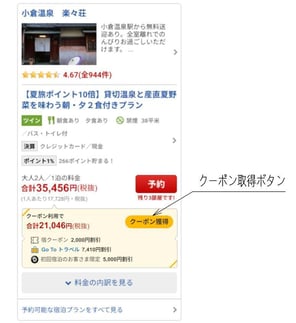
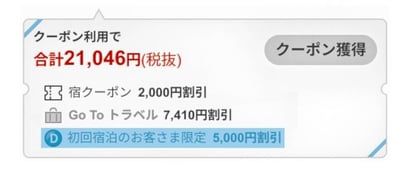
Accommodation reservation coupon acquisition screen (assuming Rakuten Travel) – Coupon usage UI for accommodation reservation site/app is also registered as a design. For example, in Design Registration No. 1687842, "Image for acquiring coupons on accommodation reservation screen," the design that allows multiple discount coupons (amount and type) to be acquired and applied on the reservation screen is protected. Although the applicant's name is not directly disclosed in the bulletin, the screen displays information such as "accommodation coupons" and "GoTo Travel" discount amounts, suggesting that the screen design is from a major travel service. In this way, Discount information presentation at the time of reservation and Coupon selection UI are also protected.
Example of design registration for chat/message screen
Chat UIs for SNS and messengers are also subject to design registration. There are also examples of UIs that allow inquiries and Q&A in a chat format.
-
Message app chat screen (Google) – Smartphone chat UI by applicant Google, LLC is registered as Design Registration No. 1621588 “Personal Information Terminal”. This design features a unique UI that allows you to change the font size and decoration by dragging a slide bar (expressiveness indicator) up and down, in addition to a message input field and send button. Because it was registered before the amendment, it is protected as a partial design (the solid line area is the scope of the right), and this is an example of a design that covers a design to improve user operability on a chat screen.
-
Inquiry chatbot screen (Arithmer) – This is an example of Inquiry answer UI using AI chatbot. Design Registration No. 1675969 "Image for displaying inquiry information" (applicant: Arithmer Co., Ltd.) registers a screen design that displays questions from users, answer candidates, and answer contents in a chat format. The screen consists of an input area, inquiry content display area, chat-style answer display area, answer candidate display area, etc., and is characterized by an interface that supports the user by presenting answer candidates. It has been registered as a partial design so that some areas (highlighted in the answer) are outside the scope of rights (designated as non-protected in red).
(*As far as the scope of this research is concerned, there are no published cases of chat screen design registrations by domestic SNS companies such as LINE.However, as mentioned above, there are examples of chat UI registrations by overseas companies, indicating that similar interfaces can also be protected by design rights.)
Example of design registration for navigation (map guide) screen
UI designs for displaying maps and route guidance have also been registered. The key point is the unique UI for traffic information and route search.
-
Route guidance/traffic information display screen (Yahoo! Maps) – Navigation application UI by applicant Yahoo Corporation, and Design Registration No. 1686757 “Image for route guidance” falls under this category. The design features a map at the top of the screen and an information panel at the bottom, displaying departure and arrival times, traffic congestion prediction graphs, travel time, etc. on a single screen. The feature is that when you change the departure time by operating the time zone slider, information such as the congestion area display and travel time on the map changes in real time. It has an excellent UI that allows users to visually check map routes and congestion predictions, and adjust schedules by operating sliders.This dynamic screen transition design is protected by design rights.
Example of design registration for home screen/menu UI
Home screens and menu screens of smartphones and devices are also registered as designs. In particular, Apple has been actively filing applications for screen designs since the revision, and multiple registered examples have been made public.
-
Home screen/menu screen (Apple) – This is a case by applicant Apple Incorporated. Design Registration No. 1691660 "Image for Menu" is a registered UI design for arranging and launching app icons and widgets on the home screen. There are two square frames on the screen that can display widgets, and the user can operate to switch between displayed widgets. This design is reminiscent of the widget arrangement function on the iPhone/iPad home screen, and is an example of protecting the app list/widget display UI. In addition, Design Registration No. 1694011 "Image for information display" registers a lock screen UI (so-called always-on display) that displays the time, battery, notifications, etc. while the device is charging. In both cases, some elements on the screen are drawn with broken lines and are outside the scope of copyright, while icon placement and information display layouts themselves are protected by solid lines.
Other notable UI design registration cases
In addition to the above, UI designs in various fields have been registered as designs. Examples include screen design for ride-hailing service apps and analysis screens for business software.
-
GUI for ride-hailing service (DiDi) – The app screen for DiDi, a taxi dispatch service originating from China, has also been registered as a design in Japan. Design Registration No. 1691930 "GUI" (applicant: Beijing DiDi Infinity Technology and Development) protects the main screen of the ride-hailing app, including the destination input form, various function icons, map navigation function, etc. It has been commented that although text elements (place names, etc.) are not constituent elements of a design, the scope of rights extends to the layout and functional arrangement of the entire GUI.
-
Business Analysis Dashboard Screen (TKC) – In the field of business software, TKC Co., Ltd. has registered examples of financial and business analysis UIs. Design Registration No. 1675961 "Image for Business Analysis" describes a screen design that plots a company's management indicators on a polygonal chart (radar chart) and displays the company's current situation, the previous period, and the industry average in comparison. Each indicator is placed at the top of a polygonal graph placed in the center of the screen, creating a UI that allows you to visually understand your company's characteristics and issues.It can be seen that suchbusiness analysis tool screenscan also be protected by design rights.
(*In this research, we were unable to confirm any cases of UI screen design registration by major domestic companies such as Sony and Nintendo from public bulletins. However, in recent years, not only overseas companies such as Apple and Google, but also Japanese companies (Rakuten, NTT Docomo, Yahoo, etc.) have been increasing the number of applications for screen designs, and more cases are expected to be published in the future.)
List of representative examples (by UI type)
The table below summarizes the typical design registration cases discussed above, organized by type of UI.
| UI type | Example of registered design (registration number) | Applicant (right holder) | Registration date | Design points |
|---|---|---|---|---|
| Payment (card information display) | Image for displaying card information (Design Registration No. 1791683) | NTT Docomo, Inc. | February 12, 2025 | Virtual card number/code display. Display security code during unlock operation |
| Reservation/Coupon | Image for acquiring coupons on accommodation reservation screen (Design Registration No. 1687842) | Rakuten Group, Inc. | 2021* | Multiple coupons that can be used when making a reservation are displayed on the screen. UI that displays a list of discount application status |
| Chat (Message) | Mobile information terminal (message communication function UI) [Design Registration No. 1621588] | Google LLC | 2018* | Chat input field and sending UI. Dynamically change text decoration with slide bar for changing text size |
| Inquiry chat | Image for displaying inquiry information (Design Registration No. 1675969) | Arithmer Co., Ltd. | 2021* | QA screen by chatbot. Interactive UI with question input field, answer display field, and answer candidate field |
| Route guidance (map) | Route guidance image (Design Registration No. 1686757) | Yahoo! Corporation | 2021* | Route guidance UI with map + traffic jam information. Congestion section display and required time change by operating the departure time slider |
| Home screen/menu | Image for menu (Design Registration No. 1691660) | Apple Incorporated | 2021* | Device home screen UI. Equipped with app icon and widget placement area, multiple page switching display |
| Ride-hailing service | GUI (Design Registration No. 1691930) | Beijing DiDi Infinity Technology and Development | 2021* | The main screen of the taxi dispatch app. Arrange destination input form, function icons, map display, etc. on one screen |
As mentioned above, many UI designs for smartphone apps and web screens have been design registered in Japan. The fact that creative designs of on-screen layouts and operational elements are now subject to protection in a wide range of fields, including payments and finance, travel and services, communication, and navigation, has implications for future UI/UX design and intellectual property strategies. It can be said that each company comprehensively protects the user interface of its services by combining not only patents (protection of functionality) but also design rights (protection of appearance and operational UI), and uses this to eliminate counterfeit products and improve brand value.
🚀 For those considering applying for an IT patent
Get strong patent rights for inventions in software, SaaS, IoT, AI, and mobile apps.
A patent attorney well-versed in the IT field will help you acquire rights that protect your business's competitive advantage. Estimates and initial consultations are free.

AUTHOR
Takefumi SUGIURA (杉浦 健文)
EVORIX Intellectual Property Law Firm Managing Patent Attorney
Supports clients across IT, manufacturing, startups, fashion, and medical industries, covering patent, trademark, design, and copyright filings through trials and infringement litigation. Specialized in IP strategy for AI, IoT, Web3, and FinTech. Member of the Japan Patent Attorneys Association (JPAA), Asian Patent Attorneys Association (APAA), and Japan Trademark Association (JTA).